



























Descent
About Descent
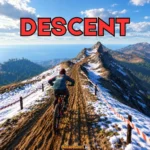
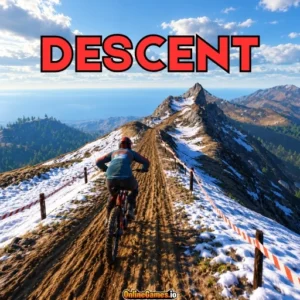
Descent is a free online downhill mountain bike time trial set on a single alpine mountain at golden hour. The 2.6 km course is a hand-routed trail packed with berms, rock gardens, root sections, jump lines, and a final sprint, and the bike is simulated for real, with progressive fork and shock, per-wheel grip, load transfer, pumping, and air control. Read the trail, carry speed through the berms, keep the wheels on dirt, and take down your personal best split by split.
You can chase the clock in Start Run or explore the hillside in Free Ride, with a first-person view, a chase camera, and a photo mode for capturing the scenery. A rider kit menu lets you change your rider’s colors, and a gamepad is supported if you prefer to play with a controller.
Controls
| Action | Keyboard |
|---|---|
| Steer (Lean Into the Turn) | A / D or Left / Right Arrow |
| Weight Forward / Back | W / S or Up / Down Arrow |
| Roll / Whip (In the Air Only) | Q / E |
| Pump (Hold Through the Compression, Release Over the Crest) | Space |
| Manual (Hold to Find the Balance Point) | M |
| Front Brake | J |
| Rear Brake | K |
| Pedal (Sprint Out of Flat Corners) | Shift |
| Reset to Checkpoint | R |
| Pause | Esc |
| Mute All Sound | P |
| Cycle Camera | C |
| Photo Mode | F |
Start Run and Free Ride
Start Run is the main mode, a timed descent with eight splits and one clock, with your personal best waiting on the line. The default track is the ranked one, and only runs on it feed the leaderboard. Free Ride removes the clock and the gates so you can session the jump line until it is dialled, which makes it the best place to practice a tricky section before you commit to a timed attempt.
Riding Physics
The bike reacts to how you ride. Pumping the backsides of rollers gains speed without pedalling, braking before a corner and leaning through it is faster than dragging the brakes, and brakes and triggers are analogue, so you can ease into them. Holding Space through a compression and releasing over the crest launches you into the air, where Q and E roll and whip the bike for style, and a manual on M lets you balance on the back wheel.
Reading the HUD
The top of the screen shows your run time and your best time, while the bottom lists the trail grade as a percentage, a balance gauge, front and rear brake bars, your current gear, a style multiplier, and a speedometer in kilometres per hour. Airtime and style points appear during jumps, and a crash message shows when you come off the bike. Crashes cost seconds, not the whole run, so you can press R to reset to a checkpoint and keep going.
Rider Kit and Settings
The Rider Kit menu swaps your rider’s colors, and the next kit unlocks after watching an ad. The Settings menu lets you choose quality from Low to Ultra, switch the camera between Chase, Wide, First Person, and Cinematic, invert the look, adjust the field of view, set master, music, and effects volume, cap the frame rate at 30, 60, or 120, and change the render resolution to run cooler on weaker computers.
Tips for Faster Runs
- Brake before a corner and lean through it, since that is faster than dragging the brakes through the turn.
- Pump the backsides of rollers to gain speed without pedalling.
- Use Free Ride to practice the jump lines, then take what you learned into a timed run.
- Keep the wheels on dirt, and reset with R after a crash instead of restarting the whole run.
How to Play Descent
- Choose a mode — Select Start Run for a timed descent or Free Ride to explore without a clock.
- Pick your camera — Press C to cycle between chase, wide, and first-person views.
- Ride the trail — Steer with A and D, shift your weight with W and S, and pump with Space.
- Brake and pedal — Use J and K for the brakes and Shift to sprint out of flat corners.
- Beat the splits — Watch the clock across all eight splits to improve your best time.
- Recover from crashes — Press R to return to a checkpoint and keep riding.
Developer
Descent is developed and published by GamePush, available to play for free on OnlineGames.io with no download or account required. The game runs in-browser and is playable on desktop.
More Games Like This
If you enjoy the realistic riding of Descent, try Real Flight Simulator for another game that rewards smooth control, or browse the full collection of free bike games on OnlineGames.io.